The Bat! v12: more compact, clearer, more convenient
We are pleased to announce the release of The Bat! v12 — the next major update of our email client, in which we focused on the convenience of everyday email work. The most important changes affect the display of message threads and the interface of key components of the program. All new features and improvements make e-mail management more compact, clearer, and more efficient.
Compact mode for Conversation View
In The Bat! v12, Conversation Thread View received a compact view mode designed for users who actively work with long and extensive conversations.
When compact mode is enabled, the vertical space taken by individual messages is reduced: spacing, headers, and auxiliary elements are optimized, while the logic of the thread structure and visual connections between messages are preserved. This allows more messages to fit on the screen without losing clarity or the structure of the conversation.
Compact mode is especially useful when analyzing conversation history, working with discussions containing a large number of replies, as well as in situations where it is important to quickly view the entire thread without constant scrolling.
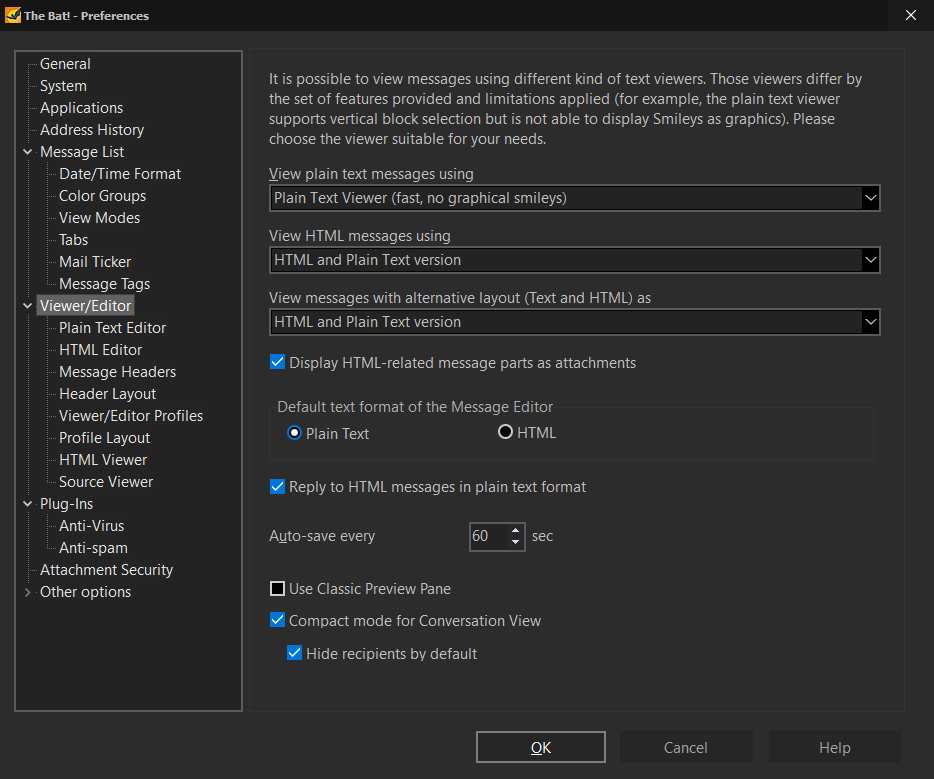
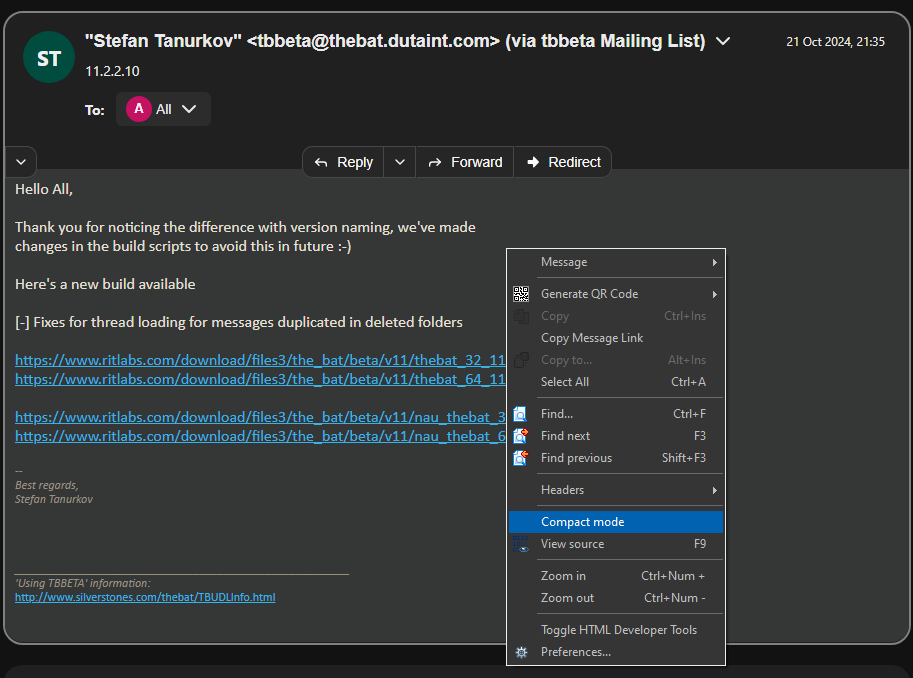
Compact mode can be quickly enabled or disabled depending on current tasks. A corresponding option is available in the context menu of a message in Conversation View, as well as in the program settings in the „Options\ Preferences\ Viewer/Editor” menu. This lets you easily adjust how conversations are displayed to your personal preferences and workflow with no extra steps.
Improved quick reply in message threads
We improved the quick reply editor in message threads. It allows you to reply to messages directly within the thread, without opening a separate editor window and without interrupting your work with the conversation.
The new version of the email client adds text formatting capabilities to the quick reply editor. When composing a reply, you now have access to basic formatting tools such as text highlighting, various styles, and other formatting elements. This makes quick replies more expressive and convenient while keeping the interface compact.
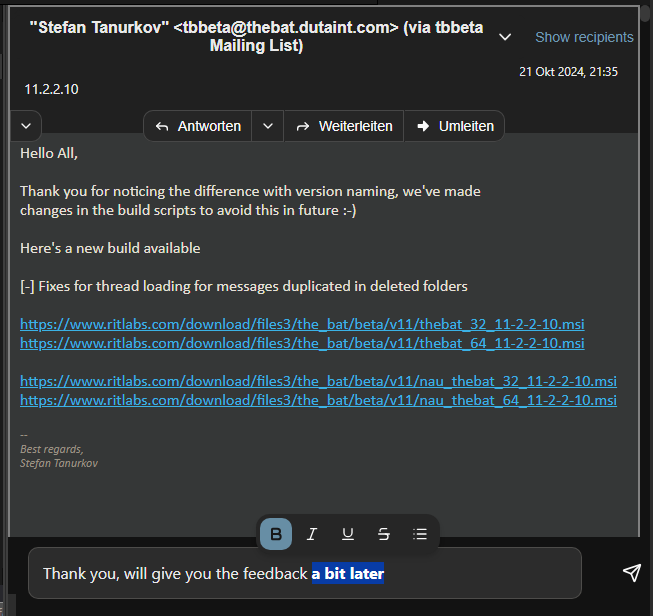
These improvements are especially noticeable during active correspondence, when it is important to reply quickly to incoming messages while preserving the context of the conversation and a consistent email style.
Simplified account creation
The process of creating new accounts has become more convenient thanks to support for automatic use of DNS autodiscovery data. When configuring a mailbox, the program can automatically retrieve server settings based on the domain of the email address, so manual input of settings is no longer required.
This simplifies the initial setup, reduces the errors, and allows you to start working with your email more quickly, especially when creating new accounts or working with corporate domains.
User interface improvements
Moreover, we introduced several visual refinements aimed at improving the convenience and consistency of the user interface. The changes affect both Conversation View and the address book.
In Conversation View, we improved visual elements that influence the clarity of actions and consistency with other areas of the program.
We have also made neat cosmetic adjustments to the new address book interface. Individual layout and alignment elements were refined to improve readability and make working with contacts more comfortable.
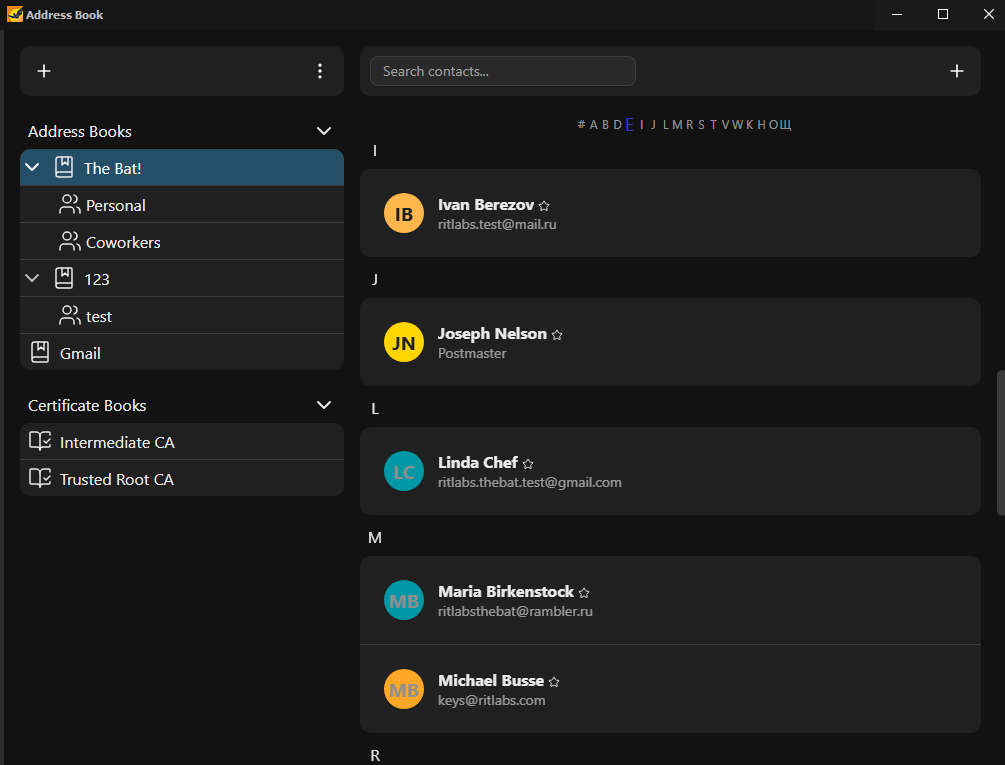
All changes respect the existing interface logic and are intended to make working with The Bat! more convenient, intuitive, and visually cohesive.
Smart Upgrade
If you purchased The Bat! v11 after June 1, 2025, we have great news for you — Smart Upgrade allows you to upgrade to The Bat! v12 free of charge without entering a key. Simply install The Bat! v12 and enjoy the new features!
Download The Bat! v12.0
Purchase The Bat! v12
Compact mode for Conversation View
In The Bat! v12, Conversation Thread View received a compact view mode designed for users who actively work with long and extensive conversations.
When compact mode is enabled, the vertical space taken by individual messages is reduced: spacing, headers, and auxiliary elements are optimized, while the logic of the thread structure and visual connections between messages are preserved. This allows more messages to fit on the screen without losing clarity or the structure of the conversation.
Compact mode is especially useful when analyzing conversation history, working with discussions containing a large number of replies, as well as in situations where it is important to quickly view the entire thread without constant scrolling.
Compact mode can be quickly enabled or disabled depending on current tasks. A corresponding option is available in the context menu of a message in Conversation View, as well as in the program settings in the „Options\ Preferences\ Viewer/Editor” menu. This lets you easily adjust how conversations are displayed to your personal preferences and workflow with no extra steps.
Improved quick reply in message threads
We improved the quick reply editor in message threads. It allows you to reply to messages directly within the thread, without opening a separate editor window and without interrupting your work with the conversation.
The new version of the email client adds text formatting capabilities to the quick reply editor. When composing a reply, you now have access to basic formatting tools such as text highlighting, various styles, and other formatting elements. This makes quick replies more expressive and convenient while keeping the interface compact.
These improvements are especially noticeable during active correspondence, when it is important to reply quickly to incoming messages while preserving the context of the conversation and a consistent email style.
Simplified account creation
The process of creating new accounts has become more convenient thanks to support for automatic use of DNS autodiscovery data. When configuring a mailbox, the program can automatically retrieve server settings based on the domain of the email address, so manual input of settings is no longer required.
This simplifies the initial setup, reduces the errors, and allows you to start working with your email more quickly, especially when creating new accounts or working with corporate domains.
User interface improvements
Moreover, we introduced several visual refinements aimed at improving the convenience and consistency of the user interface. The changes affect both Conversation View and the address book.
In Conversation View, we improved visual elements that influence the clarity of actions and consistency with other areas of the program.
We have also made neat cosmetic adjustments to the new address book interface. Individual layout and alignment elements were refined to improve readability and make working with contacts more comfortable.
All changes respect the existing interface logic and are intended to make working with The Bat! more convenient, intuitive, and visually cohesive.
Smart Upgrade
If you purchased The Bat! v11 after June 1, 2025, we have great news for you — Smart Upgrade allows you to upgrade to The Bat! v12 free of charge without entering a key. Simply install The Bat! v12 and enjoy the new features!
Download The Bat! v12.0
Purchase The Bat! v12